watchOS Concept • Cal Poly SLO
City Scope
A watchOS travel application for discovering and navigating to nearby landmarks.
TEAM
Solo Project
TIMELINE
2 Weeks
MY ROLE
Product Designer
SKILLS
Interaction Design
UX/UI Design
Information Architecture
THE PROBLEM
Sightseeing can be difficult and stressful to plan.
Many travelers love sightseeing (myself included), but hate the extensive planning process. Deciding which landmarks to visit, navigating unfamiliar places, and coordinating guided tours can quickly become overwhelming, especially when traveling solo or on trips where time is limited.
I saw an opportunity to simplify the sightseeing experience by exploring how a watchOS app can help travelers confidently navigate to and explore nearby landmarks without constantly relying on multiple mobile applications.
*Concept project created as part of an Interaction Design II course at Cal Poly SLO (Fall 2023)
IDEATION
I centered the experience around one main task: helping users navigate to and explore nearby landmarks.
Instead of trying to recreate a phone experience, I prioritized designing around the strengths of the Apple Watch including glanceable information, hands-free navigation, and location-based interactions.

From there, I explored features that would make sightseeing more accessible and reduce the anxiety of exploring unfamiliar places like:
Walking Based Navigation
Based on a user's location, City Scope generates a list of nearby landmarks within walking distance, encouraging spontaneous exploration while reducing the uncertainty of navigating unfamiliar transportation.
Pedestrian Hazard Alerts
Users receive haptic feedback, visual cues, and clear directions when the app detects pedestrian hazards or route disruptions. These alerts help travelers stay aware of their surroundings without needing to constantly check the screen.
A Guided Tour Experience
After reaching a destination, users can learn about the landmark through audio narration, written history, or a photo gallery. By offering multiple ways to engage, the app can support users with different accessibility needs (visual or auditory impairments, etc.) and allows travelers to explore at their own pace.

RESEARCH
Validating Apple Watch Capabilities
I researched Apple Maps, the most used travel watchOS app, to understand existing navigation patterns on the Apple Watch.
I found that Apple Maps already supports features such as walkable-radius detection, locating nearby points of interest, and haptic turn-by-turn navigation. These existing interactions helped validate that my design direction aligned with familiar watchOS behaviors and user expectations.

FINAL SOLUTION
City Scope: a simpler way to explore nearby landmarks.

Find a Sight
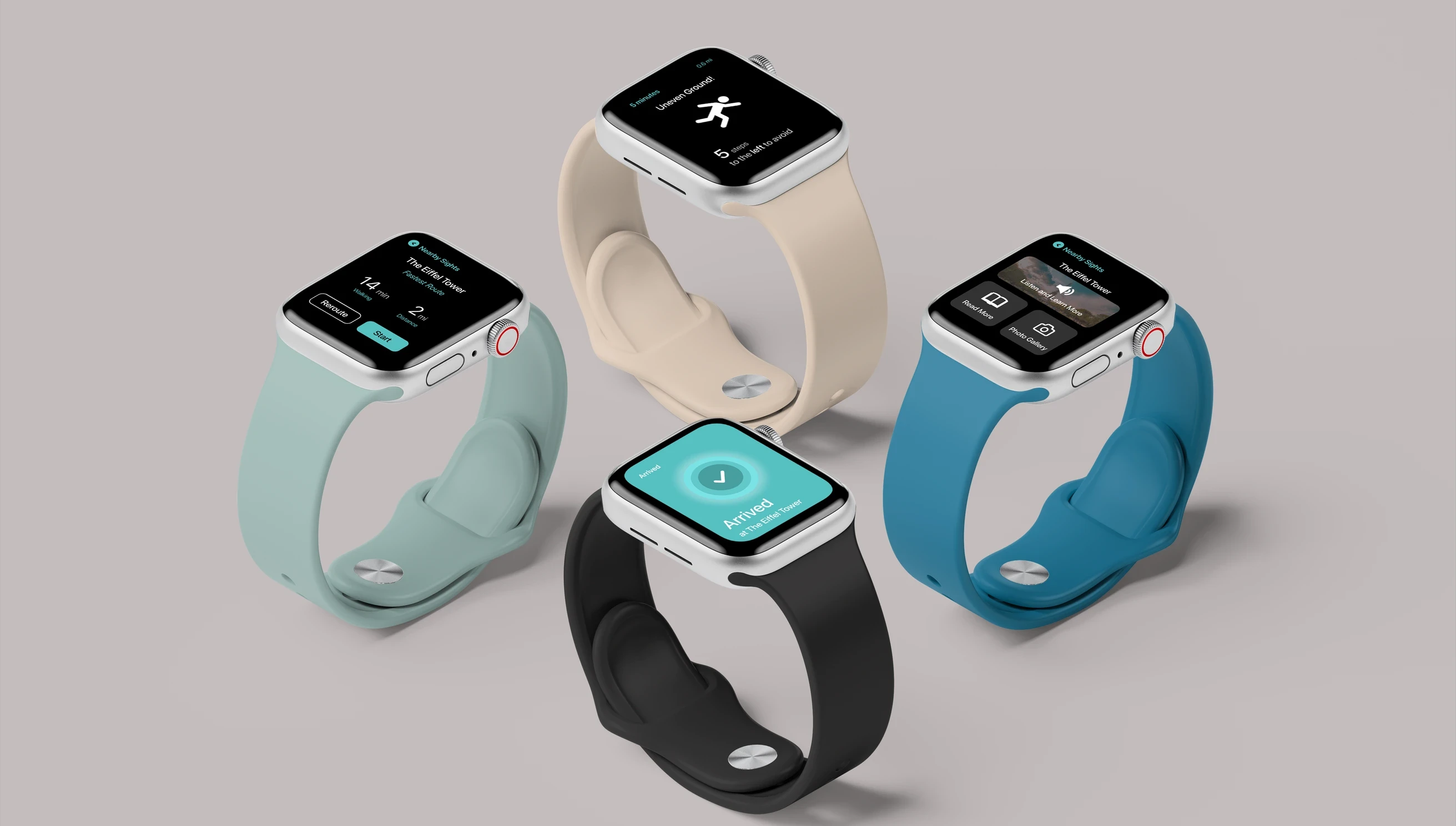
City Scope generates a list of nearby landmarks within walking distance based on user location, which can be browsed using the Digital Crown.

Simple Navigation
After selecting a landmark, view the fastest walking route and total distance.

Detailed Directions
Step-by-step walking directions update in real time based on user movement, using a combination of haptic feedback, sound, and visuals to indicate when to change direction.

Hazard and Safety Warnings
Users are alerted to known pedestrian hazards and route disruptions through visual notifications and haptic vibrations, helping them remain aware while exploring.

Arrival
Once at the destination, the screen will turn blue and vibrate, providing a clear confirmation of arrival.

Explore and Learn
At each landmark, choose how you want to learn more through an audio tour, written overview, or photo gallery.
These options help make sightseeing more accessible and spontaneous by not requiring additional planning or accommodations.
REFLECTION
What I learned…
Designing for a Wearable Device
At the time, I had never used an Apple Watch and found it both fun and challenging to think about how information should be presented. Each interaction needed to be intentional, glanceable, and easy to understand while adhering to watchOS visual design standards.
Designing with Physical Constraints
With a tight timeline and a significantly smaller screen size, I quickly realized the importance of taking the time to understand the device's unique capabilities rather than trying to scale down existing mobile interactions. Incorporating physical features like the Digital Crown and haptic feedback helped shape a viable experience natural to the Apple Watch.
